Published
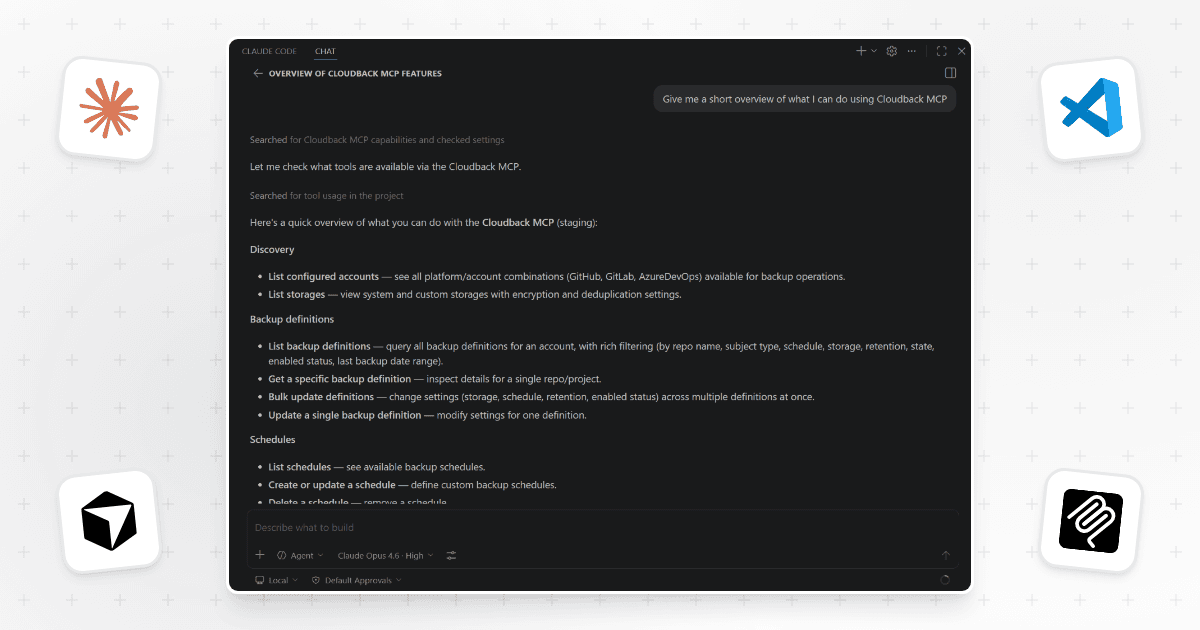
Cloudback now ships an official Model Context Protocol server that plugs the Cloudback Operations API directly into the AI assistants platform engineers already use. With the MCP server running, Claude Code, Claude Desktop, Cursor, VS Code, and any stdio MCP-compatible client can read and modify backup configuration across GitHub, GitLab, Azure DevOps, and Linear accounts through plain-language chat. It's a practical hook for the 14k+ repositories secured and 4M+ backups created that Cloudback customers depend on.
Reschedule, reassign, and retain across every account from one chat
Describe the change; the assistant calls the right tools. List and filter backup definitions across accounts, apply bulk updates to schedules, storages, and retention policies in one go, and read or adjust account-level defaults such as timezone, default schedule, default storage, and default retention. Schedules are cron-based, and retention policies have names the assistant can read off and reuse - no day counts hardcoded into each definition. An engineer running 300 repos across GitHub and GitLab can say "move every nightly backup to 02:00 UTC and extend retention to 180 days" and update 300 backup definitions with one prompt - no dashboard clicks, no script to maintain, no drift between accounts.
Set up in three steps
The server runs as a Docker image available on Docker Hub: myrtlelabs/cloudback-mcp. Configuration is a single appsettings.json file mounted read-only at /app/appsettings.json, with one entry per account and one API key per account. Multiple accounts across different platforms live in the same file, and account lookups are case-insensitive.
Create an Operations API key for each Cloudback account from the API Keys page in the dashboard.
Create
appsettings.jsonwith an entry per account: platform (GitHub, GitLab, AzureDevOps, or Linear), account name, and the API key from step 1.Register the server in the client's MCP config file (
mcp.jsonfor Claude Code, Cursor, and VS Code;claude_desktop_config.jsonfor Claude Desktop) and restart the client. Docker pulls the image automatically on first run.
Where it fits in an existing Cloudback account
The MCP server sits on top of the Cloudback Operations API and brings its backup configuration surface into chat: backup definitions, schedules, storages, retention policies, and account defaults. Teams already using the API in CI or Terraform keep those pipelines. The MCP server is the option for ad-hoc and conversational work that would otherwise mean clicking through the dashboard or writing a throwaway script.
Enable the Cloudback MCP Server by following the setup guide at docs.cloudback.it/automation/mcp-server.
Share this page: