Published

Microsoft is retiring the Office 365 Connectors service. To ensure your notifications continue to function, we have updated our Microsoft Teams integration to support the new Workflows standard.
What Changed
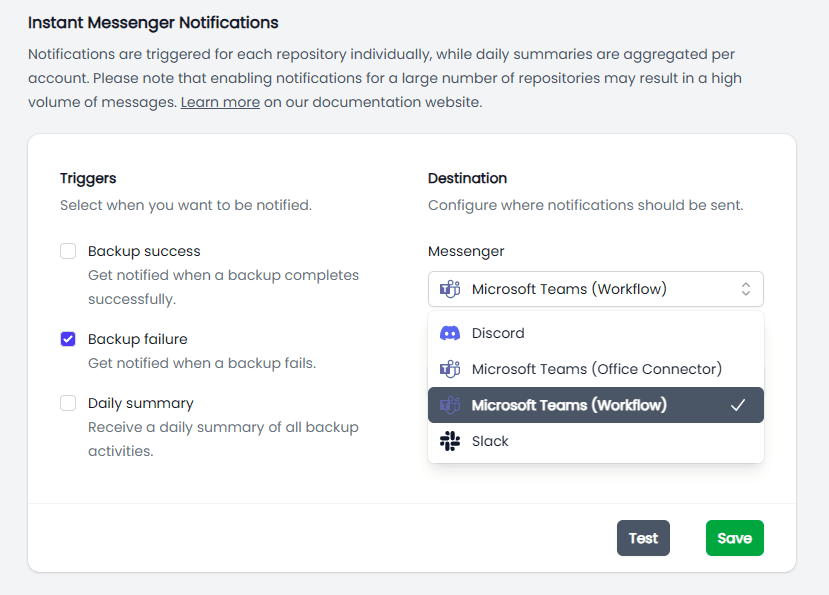
Our platform now supports two distinct Teams integrations:
Workflow (New): Uses the Teams Workflows app and Adaptive Cards via Power Automate. Use this option to ensure continued service.
Office Connector (Legacy): Maintained for backward compatibility, but is currently being decommissioned by Microsoft.
Migration Steps
To prevent notification loss, move your webhooks to the Workflows app immediately:
In Microsoft Teams: Open the Workflows app and create a "Post to a channel when a webhook request is received" flow.
Generate URL: Copy the new webhook URL provided by the workflow.
Update Cloudback Notification Settings:
Navigate to the Notification Settings page.
Select the Microsoft Teams (Workflow) integration type.
Paste the new URL and save.
Official Source
"We've extended the migration deadline to March 31, 2026 to give organizations more time to transition. In addition, we're making progress on feature parity for Workflows webhooks."
— Microsoft 365 Dev Blog: Retirement of Office 365 Connectors
Share this page: