New feature: Archive Custom Name
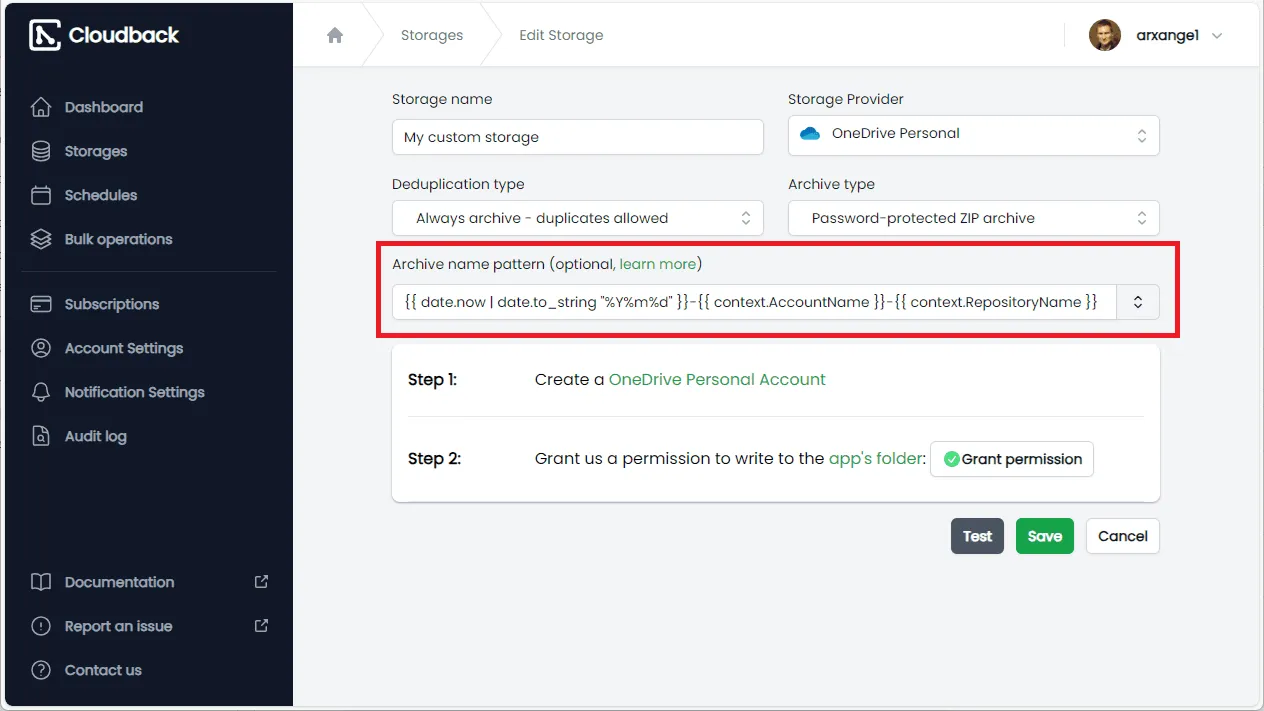
We are excited to announce the launch of a new feature in Cloudback: Custom Archive Name Patterns. This enhancement empowers you to personalize the naming conventions of your backup archives, making data management more intuitive and efficient.
Why Custom Archive Names Matter
Organizing backups effectively is crucial for quick data retrieval and overall system efficiency. With custom archive name patterns, you can:
How It Works
The feature utilizes the templating engine, allowing you to define dynamic templates for your archive names. By incorporating variables and functions, you can create meaningful and consistent names that reflect the contents and context of each backup.
Example Template
{{ date.now | date.to_string "%Y-%m-%d" }}-{{ context.RepositoryName }}-backup
This template generates archive names like 2023-10-05-MyRepository-backup, incorporating the current date and repository name.
Learn More
For detailed instructions and advanced template examples, visit our Archive Name Pattern documentation article.
Feedback and Support
We value your feedback! If you have questions or need assistance, please contact our support team.
Share this page: